
Overview
This tutorial walks through a “Count Everything” application built with Falcon Perception, a vision model designed for open-vocabulary object detection.
Given an image and a natural-language question such as “How many bears are there in the image?”, the system:
- Parses the question to extract the target object name.
- Runs open-vocabulary detection with Falcon Perception to locate every instance.
- Counts the detections and returns the answer with a visual bounding-box overlay.
Because Falcon Perception is open-vocabulary, the same pipeline works for any object category, with no retraining required.
Key design choice: We use
detectionmode (bounding boxes only) instead ofsegmentationmode. This avoids the expensive HR upsampler and keeps inference faster. For counting, we only need to know where objects are, not their pixel-precise masks.
You can download the full notebook and run it in Google Colab or in your own local environment:
📥 Download NotebookModel
For this tutorial, we use Falcon Perception, the full 0.6B model from the Falcon Perception family developed by TII.
- 0.6 billion parameters, designed for open-vocabulary grounding and instance segmentation.
- Supports open-vocabulary detection out of the box, so it can detect and count arbitrary object types without fine-tuning.
- Runs on a single CUDA-capable GPU (tested on RTX 4000 Ada 20 GB with bfloat16, ~10 GB VRAM).
Prerequisites
- A CUDA-capable GPU (tested on RTX 4000 Ada 20 GB with
Falcon-Perception+ bfloat16) falcon-perceptionpackage
References
- Falcon Perception on Hugging Face — Model weights (0.6B).
- PBench dataset — Benchmark dataset used in the examples.
Install Dependencies
Install the falcon-perception package along with Pillow for image handling:
%pip install falcon-perception
%pip install Pillow
Load Model & Build Engine
We load the full Falcon Perception (0.6B) model in bfloat16 and configure the paged inference engine. Since detection mode does not require the HR upsampler, VRAM usage stays manageable at ~10 GB.
import torch
from falcon_perception import (
    PERCEPTION_MODEL_ID,
    build_prompt_for_task,
    cuda_timed,
    load_and_prepare_model,
    setup_torch_config,
)
from falcon_perception.data import ImageProcessor, load_image, stream_samples_from_hf_dataset
from falcon_perception.paged_inference import (
    PagedInferenceEngine,
    SamplingParams,
    Sequence,
)
from falcon_perception.visualization_utils import (
    overlay_detections_on_image_v2,
    pair_bbox_entries,
)

setup_torch_config()

MAX_SEQ_LENGTH = 8192
MIN_IMAGE_SIZE = 256
MAX_IMAGE_SIZE = 1024

model, tokenizer, model_args = load_and_prepare_model(
    hf_model_id=PERCEPTION_MODEL_ID,
    dtype="bfloat16",
    compile=True,
)

image_processor = ImageProcessor(patch_size=16, merge_size=1)
stop_token_ids = [tokenizer.eos_token_id, tokenizer.end_of_query_token_id]
The engine configuration below is sized for roughly 10 GB of VRAM:
cfg = dict(
    n_pages=128,
    page_size=128,
    max_batch_size=4,
    prefill_length_limit=8192,
    max_hr_cache_entries=0,
    max_image_size=MAX_IMAGE_SIZE,
)

engine = PagedInferenceEngine(
    model, tokenizer, image_processor,
    max_seq_length=MAX_SEQ_LENGTH,
    enable_hr_cache=False,
    capture_cudagraph=True,
    **cfg,
)
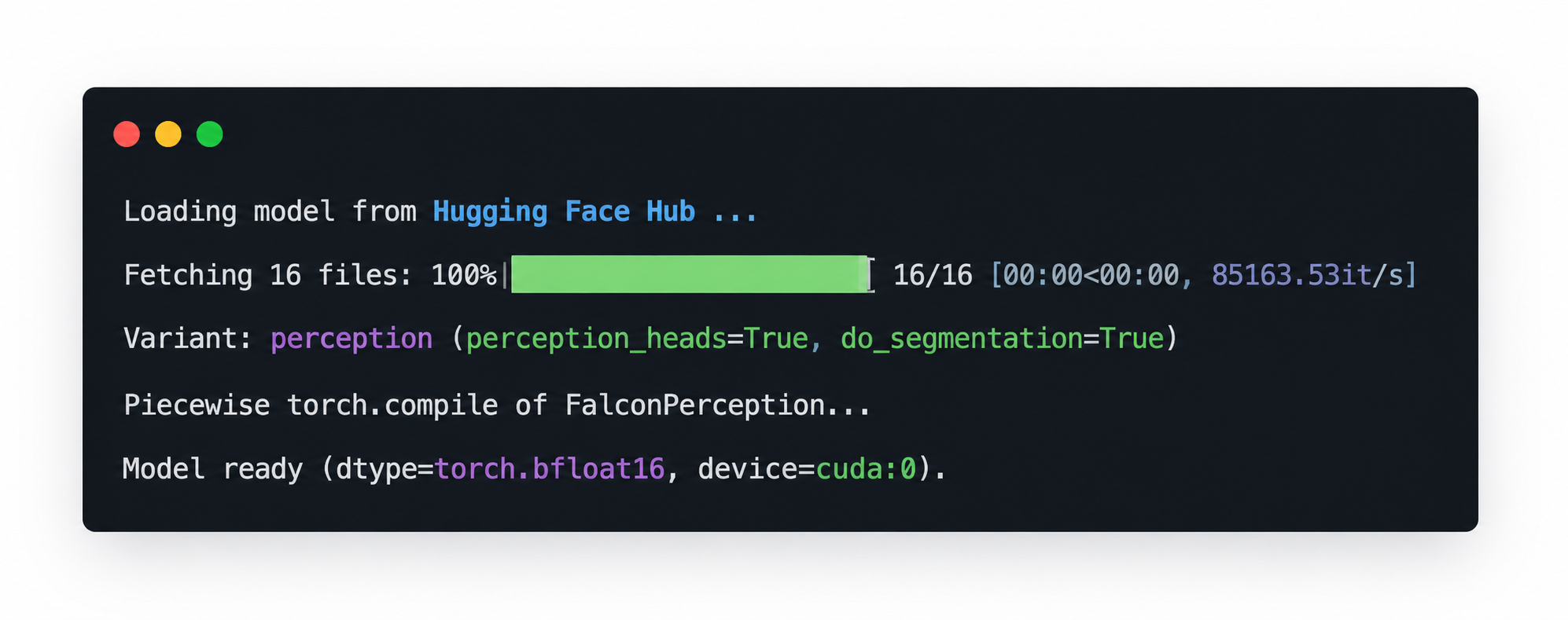
If the model loads successfully, you should see console output similar to the example below, including the Hugging Face fetch progress, the selected perception variant, and the final Model ready message. This is a good checkpoint to confirm that the model has been initialised correctly before moving on.
Warmup
We run one warmup pass to absorb the torch.compile JIT cost and CUDA graph capture overhead before real inference:
warmup_sample = stream_samples_from_hf_dataset("tiiuae/PBench", split="level_1", limit=1)[0]
warmup_prompt = build_prompt_for_task(str(warmup_sample["expression"]), "detection")
warmup_seq = Sequence(
    text=warmup_prompt,
    image=warmup_sample["image"],
    min_image_size=MIN_IMAGE_SIZE,
    max_image_size=MAX_IMAGE_SIZE,
    task="detection",
)
sp = SamplingParams(stop_token_ids=stop_token_ids)

engine.generate([warmup_seq], sampling_params=sp, use_tqdm=False, print_stats=False)
Question Parsing
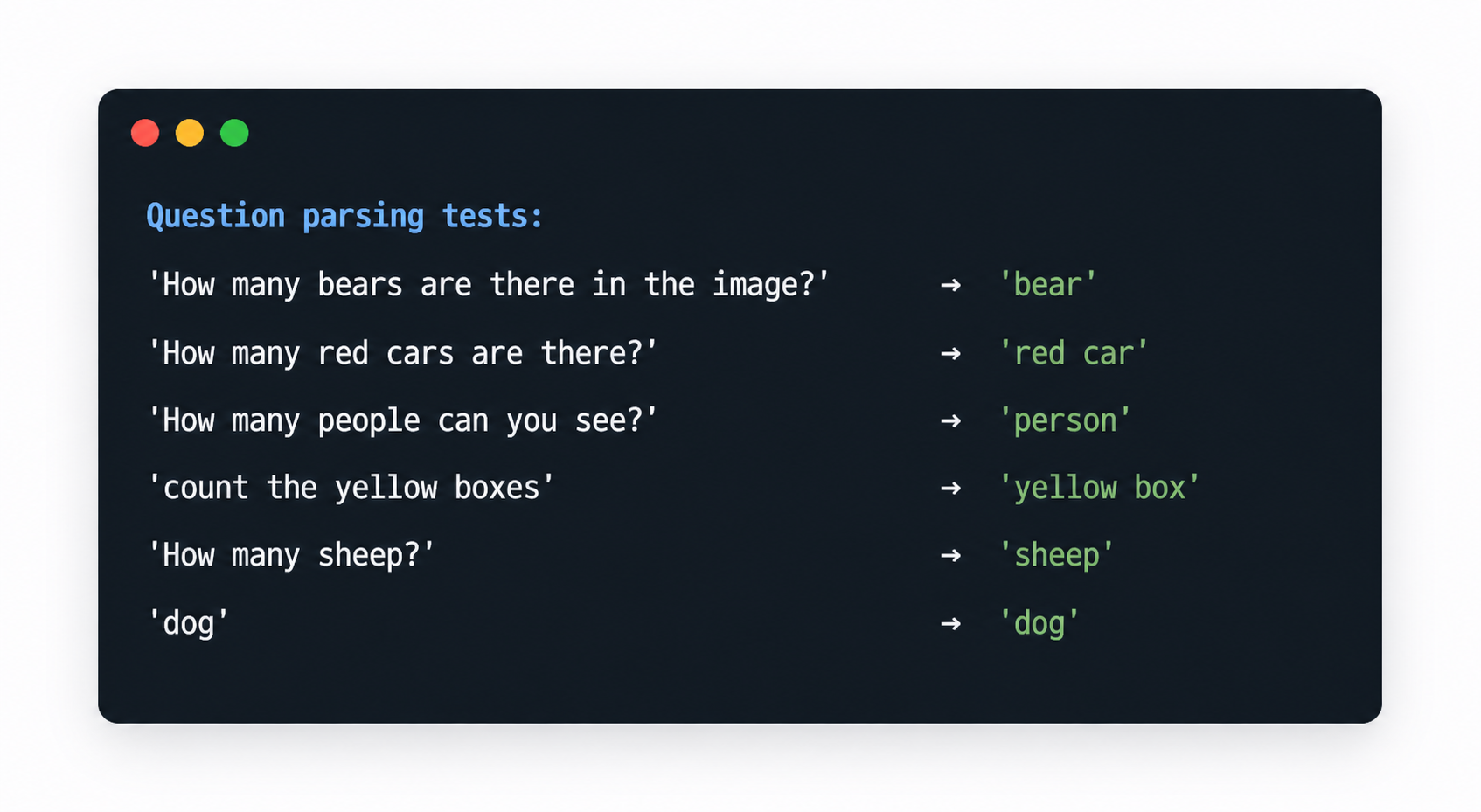
To make counting work from free-form questions, we first extract the target object from the user prompt. The parser handles several common question patterns and applies basic singularisation (for example, bears → bear, buses → bus).
Examples:
- “How many bears are there in the image?” →
bear - “Count the red cars” →
red car - “How many people?” →
person
import re

IRREGULAR_PLURALS = {
    "people": "person", "men": "man", "women": "woman",
    "children": "child", "mice": "mouse", "geese": "goose",
    "teeth": "tooth", "feet": "foot", "oxen": "ox",
    "sheep": "sheep", "fish": "fish", "deer": "deer",
}

QUESTION_PATTERNS = [
    re.compile(r"how\s+many\s+(.+?)\s+(?:are|is)\s+(?:there\s+)?(?:in|on|at)", re.IGNORECASE),
    re.compile(r"how\s+many\s+(.+?)\s+(?:are|is)\s+there", re.IGNORECASE),
    re.compile(r"how\s+many\s+(.+?)\s+(?:can|do)\s+you\s+(?:see|count|find|spot)", re.IGNORECASE),
    re.compile(r"how\s+many\s+(.+?)[\?\s]*$", re.IGNORECASE),
    re.compile(r"count\s+(?:the\s+|all\s+(?:the\s+)?)?(.+?)[\?\.\s]*$", re.IGNORECASE),
    re.compile(r"(?:number|amount)\s+of\s+(.+?)[\?\.\s]*$", re.IGNORECASE),
]


def singularise(word: str) -> str:
    word = word.strip().lower()
    if word in IRREGULAR_PLURALS:
        return IRREGULAR_PLURALS[word]
    if word.endswith("ies") and len(word) > 4:
        return word[:-3] + "y"
    if word.endswith(("ses", "xes", "zes", "ches", "shes")):
        return word[:-2]
    if word.endswith("s") and not word.endswith("ss"):
        return word[:-1]
    return word


def extract_object_from_question(question: str) -> str:
    question = question.strip()
    for pattern in QUESTION_PATTERNS:
        match = pattern.search(question)
        if match:
            raw = match.group(1).strip().rstrip("?.! ")
            words = raw.split()
            words[-1] = singularise(words[-1])
            return " ".join(words)
    return question.rstrip("?.! ").strip()
A quick sanity check:
test_cases = [
    "How many bears are there in the image?",
    "How many red cars are there?",
    "How many people can you see?",
    "count the yellow boxes",
    "How many sheep?",
    "dog",
]
for q in test_cases:
    print(f"  {q!r:55s} → {extract_object_from_question(q)!r}")
If the parser is working as expected, you should see each question mapped to a clean object label.
Core Counting Engine
The count_objects function ties everything together:
- Parse the question → extract object name
- Build a detection prompt via
build_prompt_for_task(object_name, "detection") - Run inference with
engine.generate() - Count bounding boxes via
pair_bbox_entries() - Return the count and optionally a visual overlay
def count_objects(image, question, coord_dedup_threshold=0.01):
    object_name = extract_object_from_question(question)
    prompt = build_prompt_for_task(object_name, "detection")
    seq = Sequence(
        text=prompt, image=image,
        min_image_size=MIN_IMAGE_SIZE,
        max_image_size=MAX_IMAGE_SIZE,
        task="detection",
    )
    sp = SamplingParams(
        stop_token_ids=stop_token_ids,
        coord_dedup_threshold=coord_dedup_threshold,
    )

    with cuda_timed() as t:
        engine.generate([seq], sampling_params=sp, use_tqdm=False, print_stats=False)

    bboxes = pair_bbox_entries(seq.output_aux.bboxes_raw)
    return {
        "object": object_name,
        "count": len(bboxes),
        "bboxes": bboxes,
        "sequence": seq,
        "elapsed_s": t.elapsed,
    }
We also provide count_and_display, a small helper that prints a readable answer and renders the annotated image with bounding boxes:
def count_and_display(image, question, coord_dedup_threshold=0.01, max_display_side=1024):
    result = count_objects(image, question, coord_dedup_threshold)
    obj, count = result["object"], result["count"]

    if count == 0:
        answer = f"I don't see any {obj} in the image."
    elif count == 1:
        answer = f"There is 1 {obj} in the image."
    else:
        answer = f"There are {count} {obj}s in the image."

    print(f"Q: {question}")
    print(f"A: {answer}")
    print(f"   (detected {count} instance(s) in {result['elapsed_s']:.2f}s)")

    # Render overlay with bounding boxes
    if result["bboxes"]:
        dets = [
            {"xy": {"x": b["x"], "y": b["y"]}, "hw": {"w": b["w"], "h": b["h"]}}
            for b in result["bboxes"]
        ]
        overlay = overlay_detections_on_image_v2(
            image, dets, draw_bbox=True, masks_are_binary=True,
        )
        display(Image.fromarray(overlay))

    return result
Basic Counting Demo
We start with a simple example: load an image, ask a direct counting question, and inspect the result.
from falcon_perception.data import load_image

demo_img = load_image(
    "https://huggingface.co/datasets/tiiuae/PBench/resolve/main/examples/pexels-tahaasamett-10540813.jpg"
)
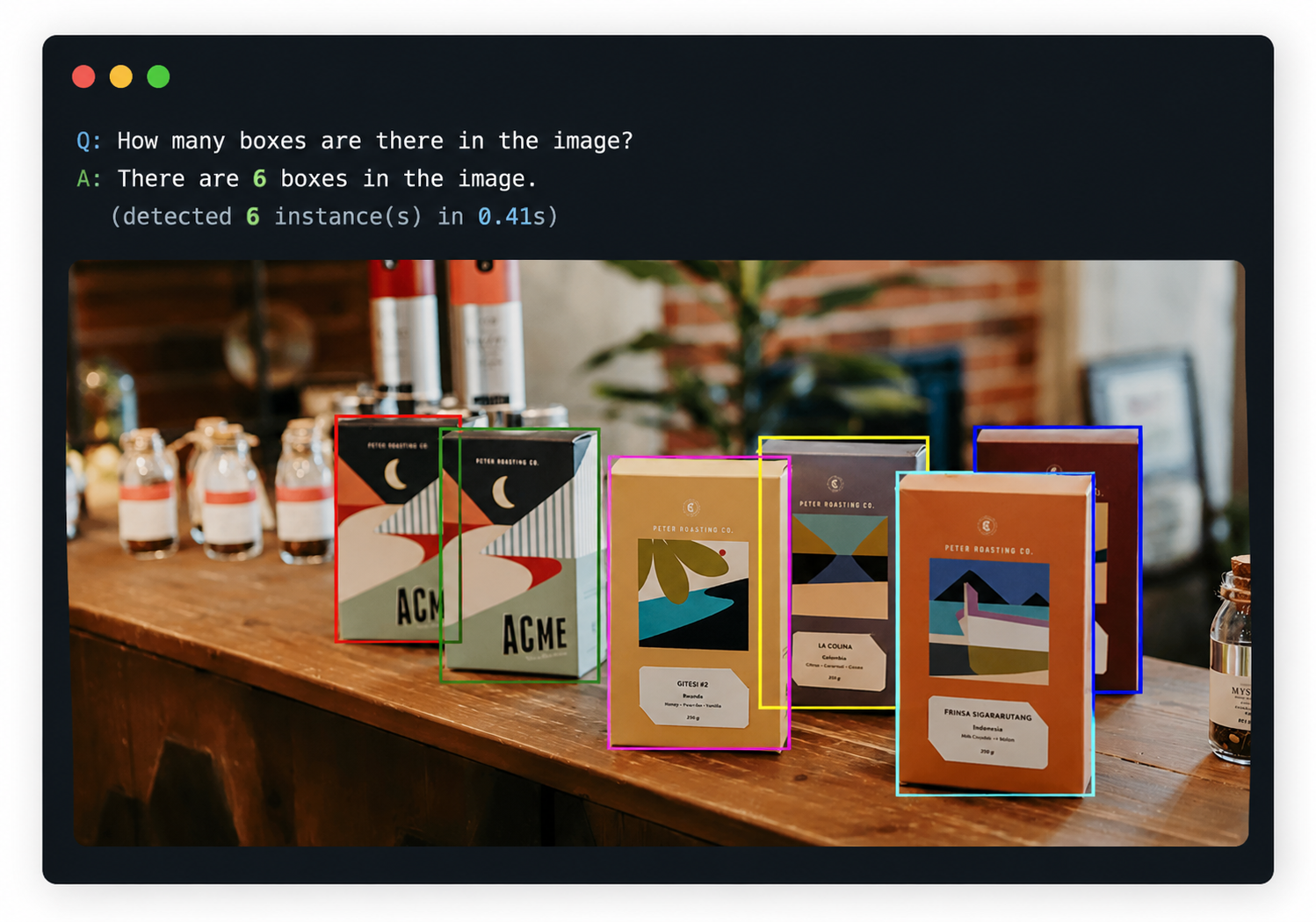
count_and_display(demo_img, "How many boxes are there in the image?")
The first result should show the detected boxes overlaid on the image together with the final count.
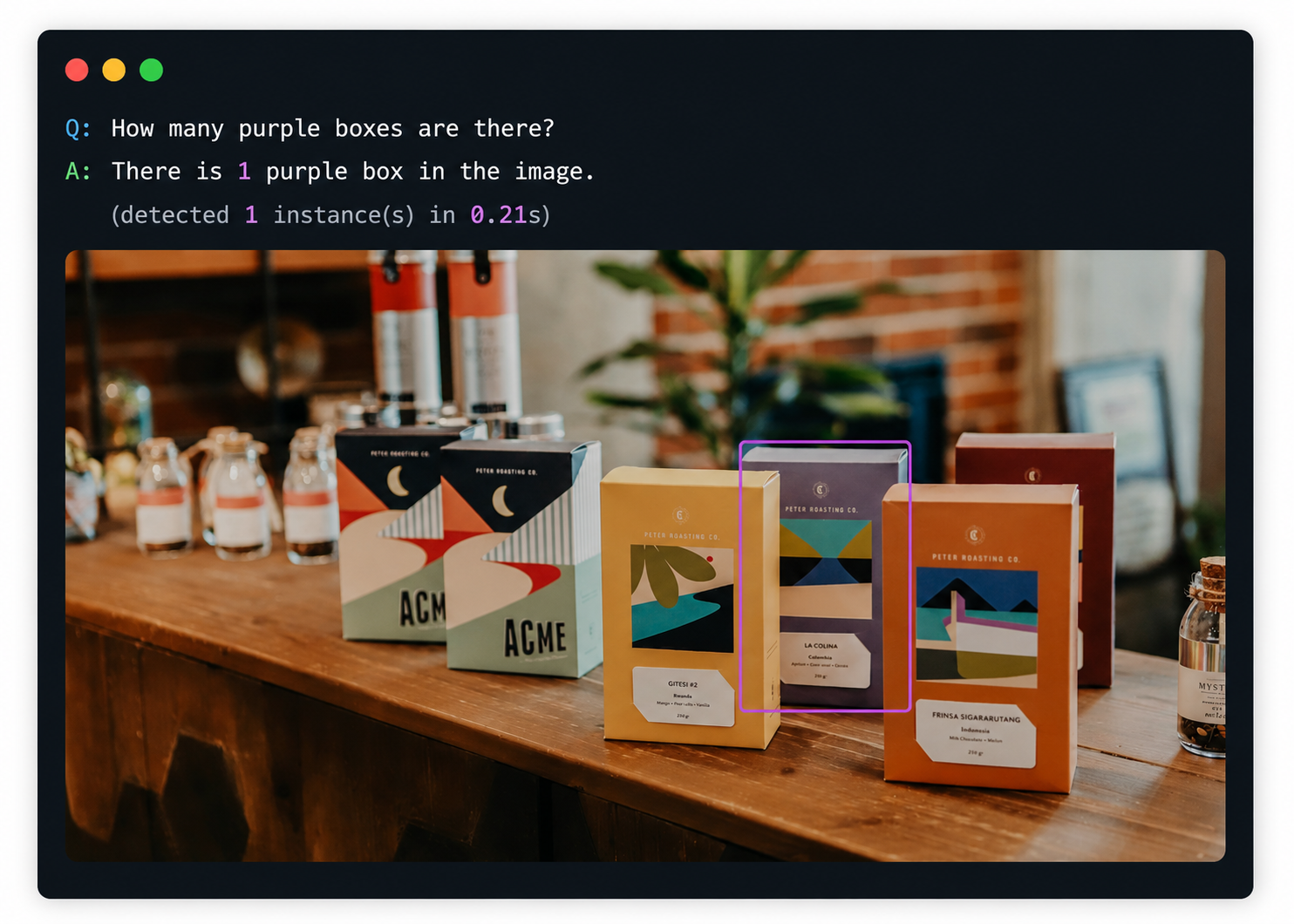
The same setup also supports attribute-filtered counting, such as counting only objects of a specific colour:
count_and_display(demo_img, "How many purple boxes are there?")
This second example is a good place to show how the model narrows the count to only the requested attribute.
Multi-Object Counting
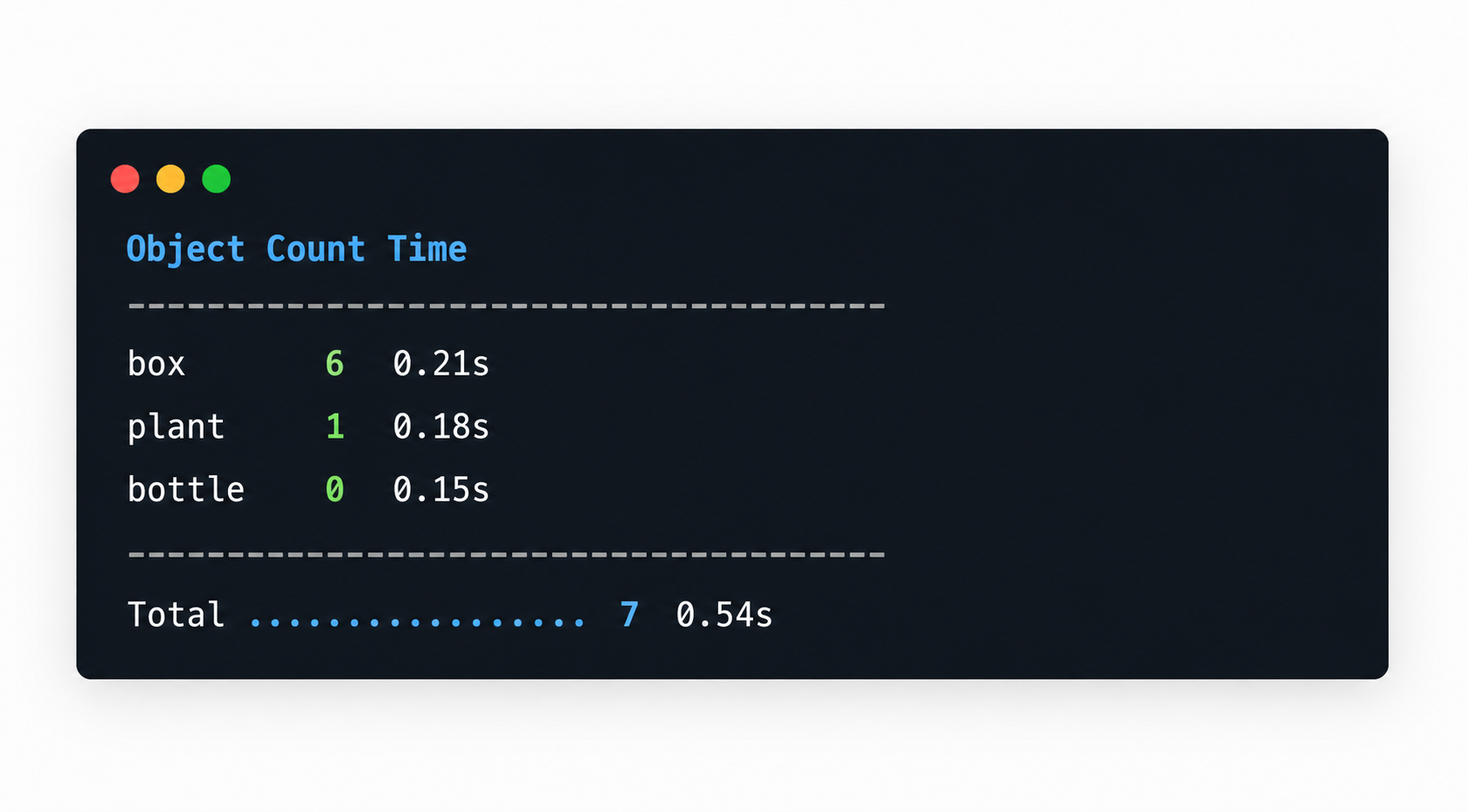
A common extension is to scan one image for several object types and summarise the results. The count_multiple_objects function runs multiple queries against the same image and prints a compact summary table:
def count_multiple_objects(image, questions, coord_dedup_threshold=0.01):
    results = []
    total_time = 0.0
    for question in questions:
        result = count_objects(image, question, coord_dedup_threshold)
        results.append(result)
        total_time += result["elapsed_s"]

    print(f"{'Object':<25s} {'Count':>6s} {'Time':>8s}")
    print("-" * 42)
    for r in results:
        print(f"{r['object']:<25s} {r['count']:>6d} {r['elapsed_s']:>7.2f}s")
    print("-" * 42)
    print(f"{'Total':.<25s} {sum(r['count'] for r in results):>6d} {total_time:>7.2f}s")
    return results
questions = [
    "How many boxes are there?",
    "How many plants can you see?",
    "How many bottles are there in the image?",
]
multi_results = count_multiple_objects(demo_img, questions)
The summary table gives a quick overview of per-object counts and runtime.
Dense Counting: Closely Packed Objects
Counting becomes harder when an image contains closely packed objects, such as a flock of sheep in a field.
The coord_dedup_threshold parameter matters a lot in this setting:
0—> keep all predictions, including near-duplicate overlapping boxes → over-counts.0.01—> merge boxes whose centres are within 1% of normalised distance → cleaner counts.
Below, we compare both settings on the same scene:
dense_img = load_image(
    "https://huggingface.co/datasets/tiiuae/PBench/resolve/main/examples/sheep.jpg"
)
# Without dedup
result_no_dedup = count_and_display(dense_img, "How many sheep are there?", coord_dedup_threshold=0)

# With dedup
result_dedup = count_and_display(dense_img, "How many sheep are there?", coord_dedup_threshold=0.01)

print(f"\nDedup reduced count from {result_no_dedup['count']} → {result_dedup['count']} "
      f"(removed {result_no_dedup['count'] - result_dedup['count']} duplicate detections)")
Hardware note: Dense counting on closely packed objects is particularly sensitive to numerical precision. For best results in this scenario, we recommend loading the model in float32 (
dtype="float32") rather than bfloat16. This requires approximately 2× the VRAM (~20 GB) but produces significantly more accurate detection boundaries, reducing both missed detections and false duplicates. The code above is ready to run as-is. You simply update thedtypeparameter inload_and_prepare_model()when sufficient GPU memory is available.
⚠️ Note: A
coord_dedup_thresholdof0.01is a good default for dense scenes because it helps reduce over-counting from overlapping detections.
Different Object Types
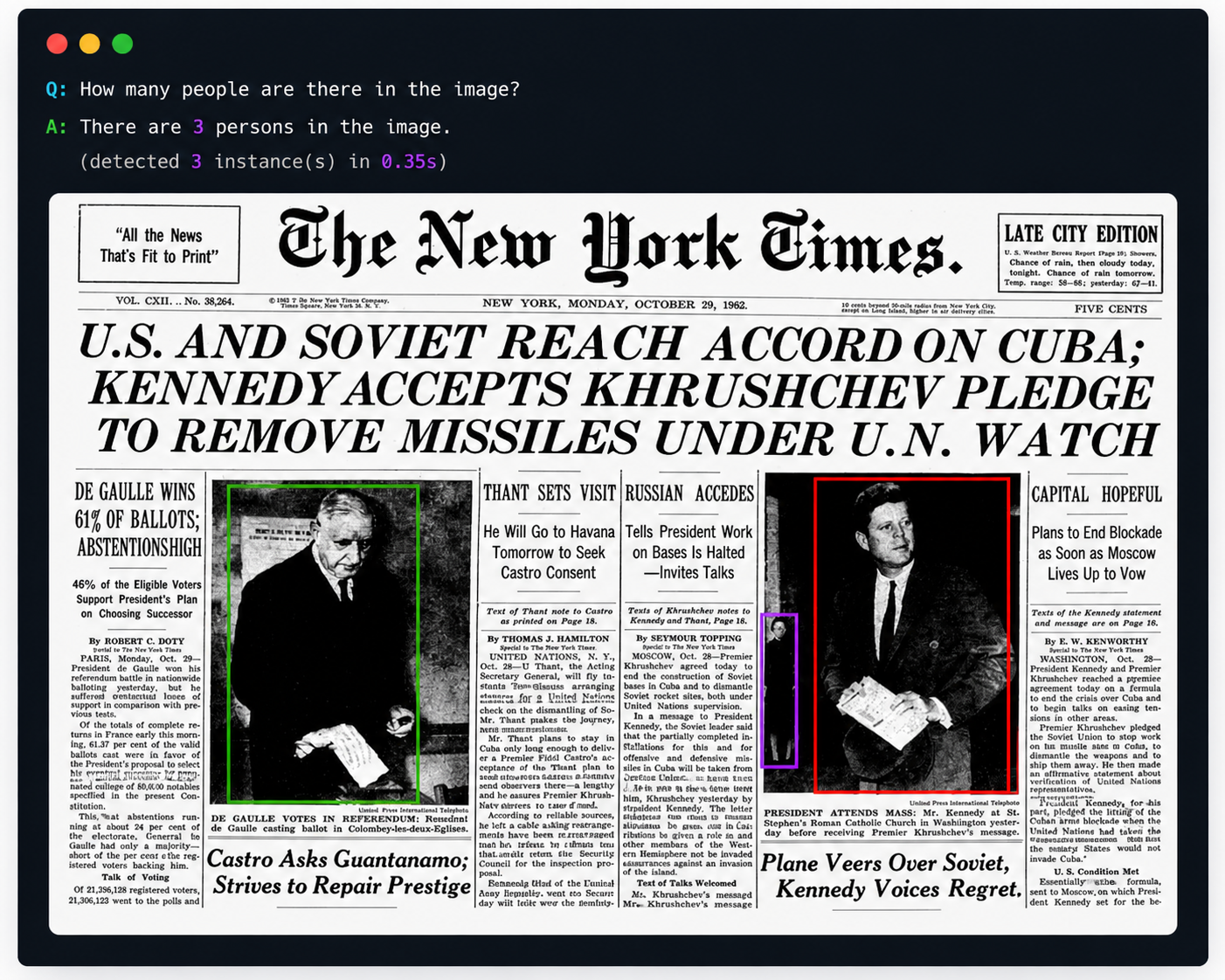
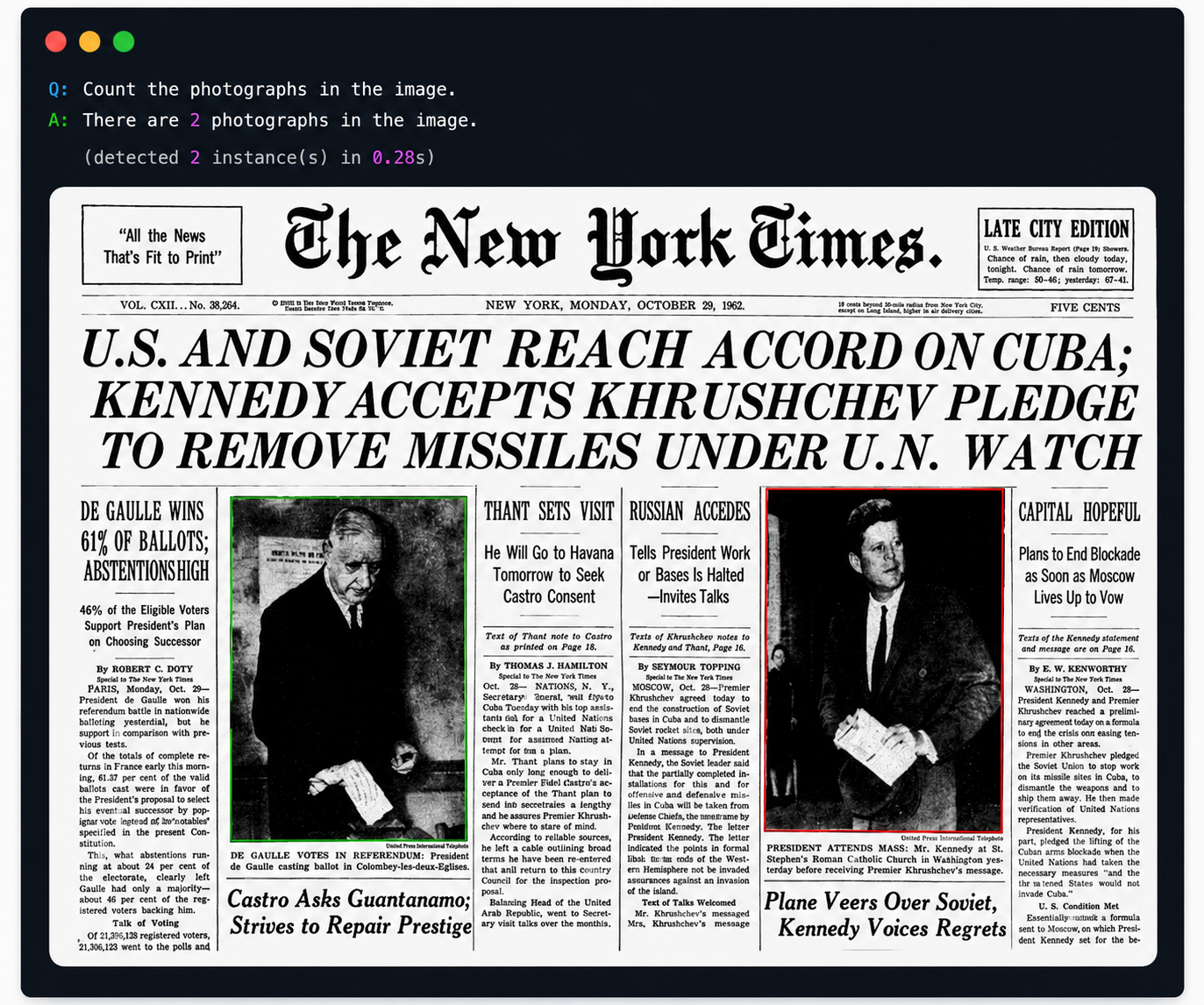
Falcon Perception is open-vocabulary, so it can count anything it can detect. Here we switch to a different image and ask about different object types:
nyt_img = load_image(
    "https://huggingface.co/datasets/tiiuae/PBench/resolve/main/examples/nyt.jpg"
)

count_and_display(nyt_img, "How many people are there in the image?")
count_and_display(nyt_img, "Count the photographs")
These examples are useful for showing the model generalising across object types in the same image.
Try It Yourself
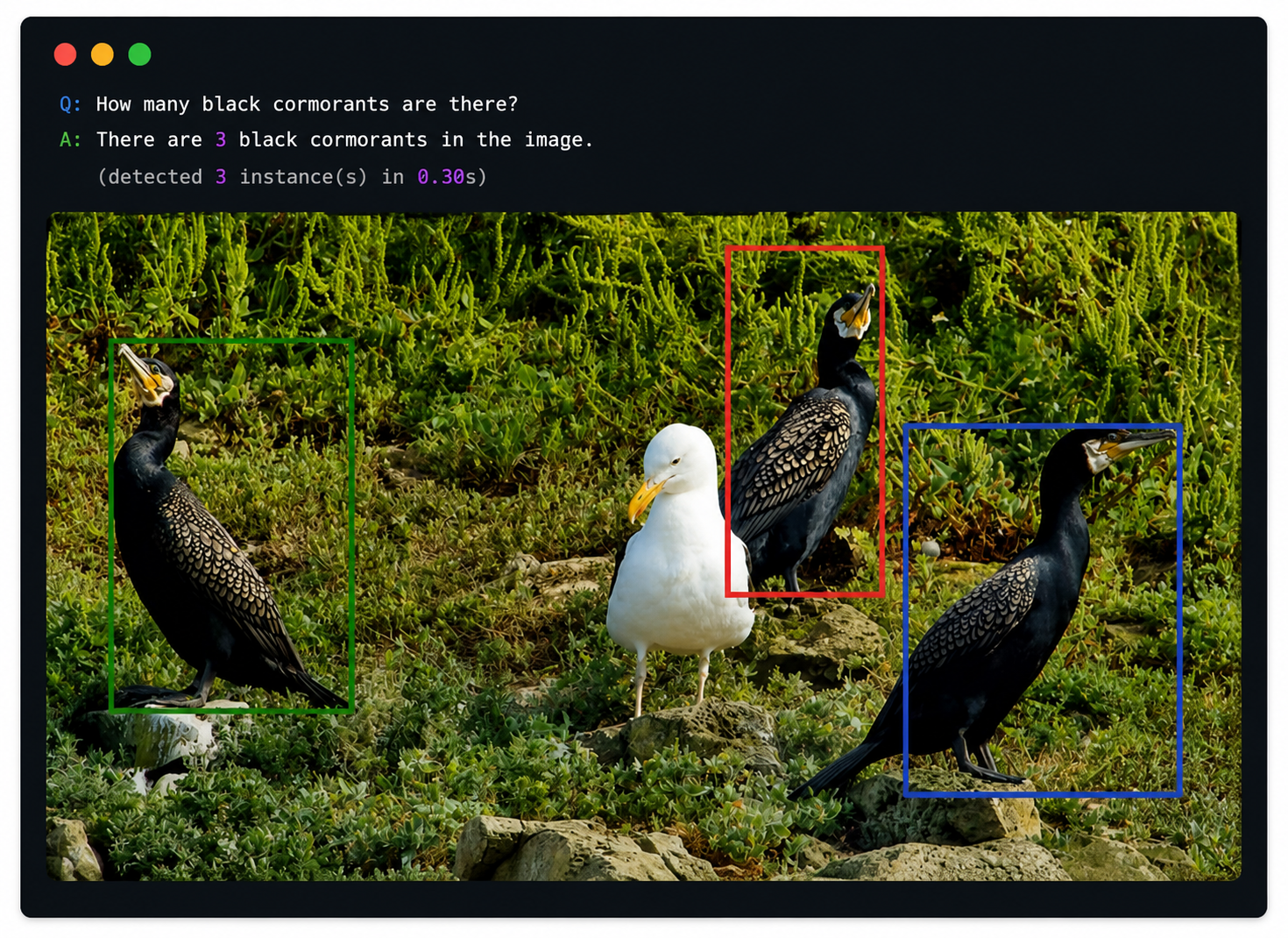
You can also plug in your own image, either from a URL or a local path, and ask any counting question you like:
YOUR_IMAGE = "https://huggingface.co/datasets/tiiuae/PBench/resolve/main/examples/seagull.jpg"
YOUR_QUESTION = "How many black cormorants are there?"

user_img = load_image(YOUR_IMAGE)
count_and_display(user_img, YOUR_QUESTION)
If you want to make the tutorial feel more hands-on, this is also a good place to include a screenshot from a custom example run.
Batch Object Inventory
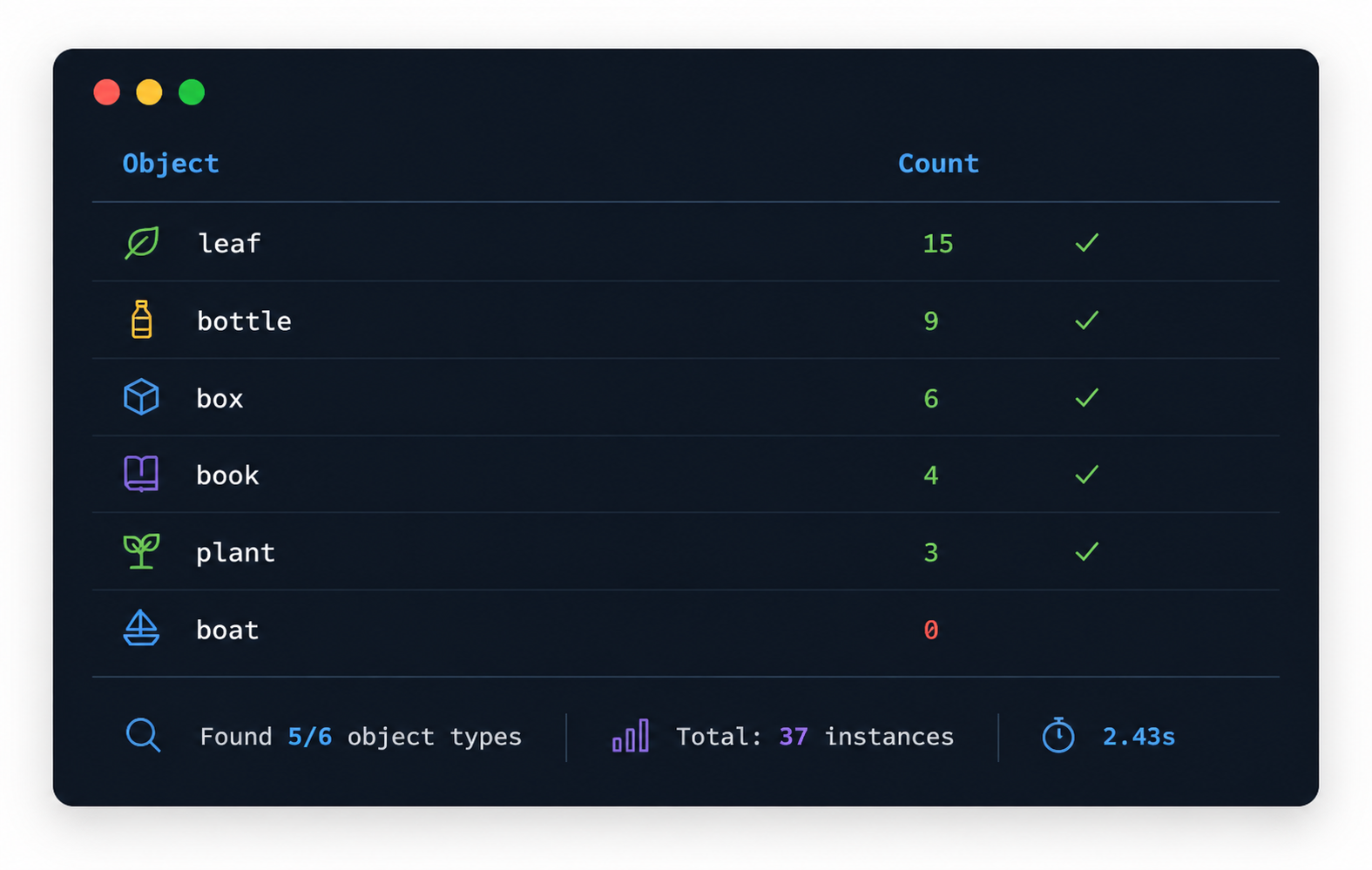
Given a list of object categories, we can scan an image and produce a simple inventory. This is useful for scenarios such as warehouse inspection, wildlife surveys, or retail shelf auditing:
def object_inventory(image, object_names, coord_dedup_threshold=0.01):
    inventory = {}
    total_time = 0.0
    for name in object_names:
        result = count_objects(image, name, coord_dedup_threshold)
        inventory[result["object"]] = result["count"]
        total_time += result["elapsed_s"]

    print(f"{'Object':<25s} {'Count':>6s}")
    print("=" * 33)
    for obj, cnt in sorted(inventory.items(), key=lambda x: -x[1]):
        marker = "  ✓" if cnt > 0 else ""
        print(f"{obj:<25s} {cnt:>6d}{marker}")
    print("=" * 33)
    found = sum(1 for c in inventory.values() if c > 0)
    print(f"Found {found}/{len(object_names)} object types | "
          f"Total: {sum(inventory.values())} instances | {total_time:.2f}s")
    return inventory
inventory = object_inventory(demo_img, [
    "box", "plant", "bottle", "book", "leaf", "boat",
])
The inventory output works well as a screenshot because it shows a compact, practical summary of everything found in the image.
Optional: Counting with Segmentation Mode
Throughout this tutorial we used detection mode (bounding boxes only) because counting only needs to know where objects are — not their pixel-precise boundaries. This keeps inference fast by skipping the HR upsampler.
However, if you need mask-level detail (e.g. measuring object area, pixel-level editing, or visual verification of boundaries), Falcon Perception also supports segmentation mode. Here’s how to adapt the workflow:
- Rebuild the engine with the HR cache enabled — set
enable_hr_cache=Trueandmax_hr_cache_entries=4(or higher depending on your batch size). - Change the task in
build_prompt_for_task()andSequence— use"segmentation"instead of"detection". - Access masks from the output — after generation,
seq.output_aux.maskscontains per-instance binary masks. Pass them tooverlay_detections_on_image_v2(..., masks=masks)for visualisation.
Trade-off: Segmentation mode is noticeably slower due to the HR upsampler. For pure counting tasks, detection mode is recommended. Use segmentation only when you actually need the mask output.
Summary
In this tutorial, we built a “Learning to Count Everything” workflow on top of Falcon Perception:
| Section | What it covers |
|---|---|
| Question Parsing | Extract the target object from natural-language questions (regex-based, handles plurals) |
| Core Counting | count_objects() — parse question → detect → count bounding boxes |
| Basic Demo | Single-object counting with and without attribute filtering |
| Multi-Object | Ask multiple counting questions on one image |
| Dense Counting | coord_dedup_threshold for accurate counts with closely packed objects |
| Different Objects | Open-vocabulary counting works for any object type |
| Try It Yourself | Plug in your own image + question |
| Batch Inventory | Scan an image for a list of object categories |
| Segmentation Mode | Optional pixel-precise masks alongside counts |
Key takeaways:
- Detection mode is preferred for counting — faster since it skips the HR upsampler.
coord_dedup_threshold=0.01is recommended for dense scenes to avoid over-counting.- The system is open-vocabulary — no retraining needed for new object types.
- For pixel-precise output, switch to segmentation mode at the cost of higher latency.
Contributors
Falcon LLM team